Featured
Showing posts with label Mobile. Show all posts

Mobile hidden codes

Nokia Mobiles top hidden codes and secrets
Here are some of the hacking tips and tricks of Nokia Mobile.Try them and Enjoy

1] *#0000#  Displays Your Phones software version,Ist line: Software version, 2nd line: software release date,3rd line: compression type

2] *#9999#  Phones softwares version if *#0000# does not work

3] *#06#  For checking the international Mobile Equipment identity(IMEI number)

4] *#2640#  Displays security Code in use

 5] #pw+1234567890+1#   Provides Lock Status(use the * button to obtain the "p,w,+" symbols for following codes)

 6] #pw+1234567890+2#   Network Lock Status(use the * button to obtain the "p,w,+" symbols for following codes)

 7] #pw+1234567890+3#  Country lock Status (use the * button to obtain the "p,w,+" symbols for following codes)

 8] #pw+1234567890+4#  SIM card Lock status(use the * button to obtain the "p,w,+" symbols for following codes)

9] *#21#  Allows u to check the number that "All Calls" are diverted to

10] *#30#  Lets u see the private number

11] *#43#  Allows u to check the "Call waiting" status of your phone
12] *#61#  Allows u to check the number that "On No reply" calls are diverted to

13] *#62#  Allows u to check if the " Divert is unreachable"

14] *#67#  Allows u to check the "On Busy Calls"

15] *3370#  Activate Enhanced Full Rate Codec(EFR).Your phone uses the best sound quality                              but talk time is reduced usually approx.5%            

16] *#4720#  Activate half rate codec.Your  phone uses the lower sound quality but talk time is gained usually for 30%

17] *#73#  Reset Phone timers and game scores

18] *#7760#  Shows the manufactures code

19] *#7780#  Restore Factory Setting

20] *#8110#  Software version for the Nokia 8110

21] *#94870345123456789#  Deactivate the PWM menu

22] *#92702689#  Displays serial number,date made,purchase date,date of last repair(0000 for       no repair) and transfer user data
23] *#7370#  Format whole Phone and it may ask for password and the default password is  12345
How to Speed up your Mobile Phones?
A real working hacking tips to speed up ur Mobile phone.First I was also not sure that it works but when tried I knew that it works.Follow this instruction::::::::::::
First change Ur phone date to 03/04/2005.Go to Menu->office->To do list.Make a new to do note with the following data:

Subject: Speed  Due date:04/08/2005  Priority: High and then press Done but don't exit.

Again,make another note with following data:

Subject: Qoukie  Due date:04/08/2005  Priority: Low and press Done and exit to stand by screen.

Now,go back again to To do list.Then Press "options" and "mark as done"[Do this to the notes in the order above]Again exit and update the phones date.

One place where Android and Windows Phones have the iPhone beat: Wi-Fi Calling

One place where Android and Windows Phones have the iPhone beat: Wi-Fi Calling

One place where Android and Windows Phones have the iPhone beat: Wi-Fi Calling
In most respects, I've been really happy with T-Mobile since I switched in April. I pay much less for service through T-Mobile than I did through either AT&T or Verizon, and on the odd occasion I've had to contact their customer service (only twice so far), I've been left feeling better than I did any time I ever had to contact their competitors. However, T-Mobile shares one flaw with those other services: their coverage sucks inside my house. That's why I want Wi-Fi Calling. It's a feature that T-Mobile has on several of its Android and Windows Phone handsets, but it isn't available on the iPhone. At least not yet.

The case for Wi-Fi Calling

I live in an area well outside the city where cell tower coverage can be spotty. Most of the time, driving around, it's not a big deal, but when you get to the entrance to my subdivision, geography and distance from towers makes it tough for cell signals to penetrate. It's no different with any of the "big four" carriers - they all stink in my neighborhood.
When I was an AT&T customer, it got so bad that AT&T ended up sending me a "Micro-Cell" - a small cell base station that connected to my cable modem, routing calls over the Internet instead of relying on a cell tower. In my house I had four full bars of coverage. It was great. But AT&T is expensive. And their customer service has left me wanting on more than one occasion.
But that's only for AT&T. And it also requires extra hardware to attach to your cable modem. Also, my Micro-Cell was finicky. I had to reset it a few times. And doing so required me to log in to AT&T's web site. It was just a lot of work.
T-Mobile used to offer a similar product called the Cel-Fi. They've suspended that program, but Cel-Fi still sells them direct for $575.

How it works

T-Mobile has gone a different direction. Instead, they've embraced a technology called UMA, or Unlicensed Mobile Access. The principal is the same: your voice and data are transmitted over a broadband connection, creating a "virtual" GSM connection over the Internet, through your cable modem. The difference is that you're not relying on a small base station to do it. It's working through software alone.
This also helps shore up one of the single biggest issues with T-Mobile in general - the radio frequencies its towers use aren't great at permeating solid structures like buildings. At least, they're not as good as the radio frequency spectrum licensed to AT&T. So it helps them shore up coverage where you might be in a building that has a Wi-Fi hotspot you can use.
It's a nifty trick. And through T-Mobile, it's a feature the company calls "Wi-Fi Calling." If you stop into a T-Mobile store or a mall kiosk, you'll find that several of the Android phones, BlackBerrys (while they remain) and even the Nokia Windows Phones on display, all support the feature. The iPhone still doesn't. It's not just T-Mobile, either - Apple simply hasn't activated a UMA feature on the iPhone, anywhere.
UMA isn't something that's unique to T-Mobile. Orange uses it in the UK. It's used elsewhere also. It's not widespread, but it's not totally uncommon, either.

But why not FaceTime or Skype?

There is certainly no shortage of ways to initiate voice communication over IP using the iPhone. Skype is one obvious way; FaceTime Audio works too. There are other VoIP apps you can download as well.
But they're all fundamentally different than UMA, because none of them - with the exception of FaceTime, and even then, only for other FaceTime users - are linked with your handset phone number.
Wi-Fi Calling is, and it's seamless. If you're on a Wi-Fi network, you can make or receive a call. Your handset is just as useful indoors as it is outdoors. It just works.

So why doesn't Apple support UMA on the iPhone?

I'd love to know the answer to that question. To the best of my knowledge, Apple's never stated its opinion on UMA one way or the other. I'm unaware of any particular security issues that would make an iPhone running UMA susceptible to problems.
T-Mobile is the only carrier in the U.S. that supports UMA, and Apple's relationship with T-Mobile is still fairly new. And while the iPhone has made a positive contribution to T-Mobile's subscriber base, T-Mobile is still the smallest of any of the "big four," so I suspect their influence with Apple is still fairly minor.
In all likelihood, Apple hasn't added Wi-Fi Calling to the iPhone simply because it really doesn't need to in order to sell the iPhone. Apple's not in the habit of making a lot of carrier-specific concessions.
Regardless, Wi-Fi Calling is a truly useful feature, and it's something that helps the iPhone's competitors differentiate themselves. For those of us who have decided to go with T-Mobile because of cost savings, fast LTE or simply because they're not who we were doing business with before, Wi-Fi Calling would be a fantastic feature. I hope Apple allows it on the iPhone.
In the interim, I'm getting used to it being pretty quiet around the house. Though I do have to spend a lot of time responding to voicemails when I leave.
Maybe I'm being myopic by expecting Apple to make up for a shortcoming in my carrier's coverage area. But this problem isn't unique to my carrier, and I know I'm not alone. A lot of us suffer from crappy cell service either at home or at work - wouldn't it be nice to have four full bars wherever you have a decent Wi-Fi signal?


+1 Battery

+1 Battery

For those of us who use our smartphones day in and day out, battery life can be a tricky thing to manage. If you don't mind charging your phone throughout the day, or if you're one of the lucky ones who can make it from morning to night, then the built-in battery on your phone might make the grade. But what if you use your device constantly, or demand power-hungry activities such as Wi-Fi hotspots, GPS, or screen brightness to take on the sun?
Luckily there are a few solutions to help solve the battery battle.

BoostedBattery

I recently got my hands on a bigger internal battery for my Galaxy Nexus. You can see it came with a replacement battery cover to allow for the expanded size.
It's done wonders for my battery life, seeing as I am a constant user. This extended size adds almost three-times the capacity over stock.
The kit was mailed with two batteries, covers, and an external charger. It cost me about $20 and arrived in 15 days, not a bad deal.
In the first frame, you can see how light use and wise Sync, GPS, and WiFi management can get you far. The extra power easily gets me through a light day of music, and holds up well for days of heavy use. I topped it up for an hour or two to get to the 2d 10h mark. This Gnex is running the latest Paranoid Android.
If you are one of the lucky android users with a removable back cover and battery, you might be able to find a 3800mAh battery like this to boost it, that is if you don't mind the love handles.


Battery Case

__kgrhqvhjb8fgtwcrsppbr2eifzbq___60_3_jpg_

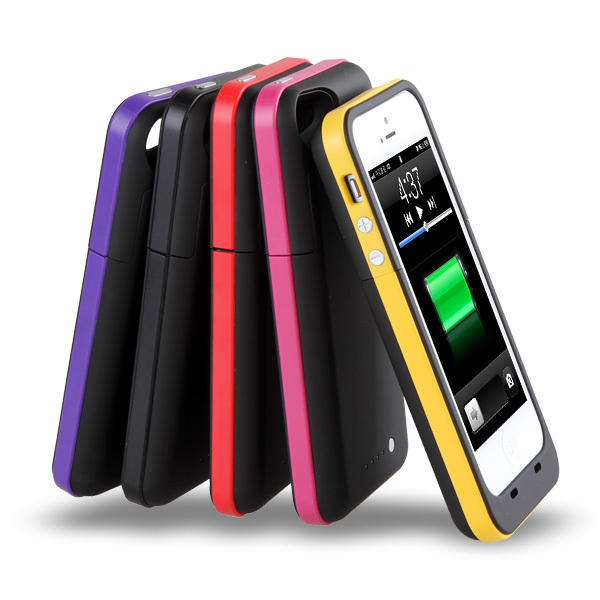
One of the most common things to find when looking for mobile power are these phone cases. Mostly for iPhones, these cases provide an extra few hours of use on top of your stock battery.
The one pictured is listed as 2000mAh case for the iPhone 5, which packs Apple's 1440mAh internally. In theory, a case like this can clip-on 125% of usage time. Pretty impressive, but a little expensive for $32.
A case battery adds bulk to your phone, in a very noticeable way compared to an internal battery. But it should likewise lengthen your time away from the charger. It also seems to be the only off-the-shelf iPhone battery upgrade.

Battery Bank

Sioasgx_medium
If you don't mind sparing a spot in your pocket, purse, or bag, an external USB power bank may be the perfect solution to charge your gadgets on the go.
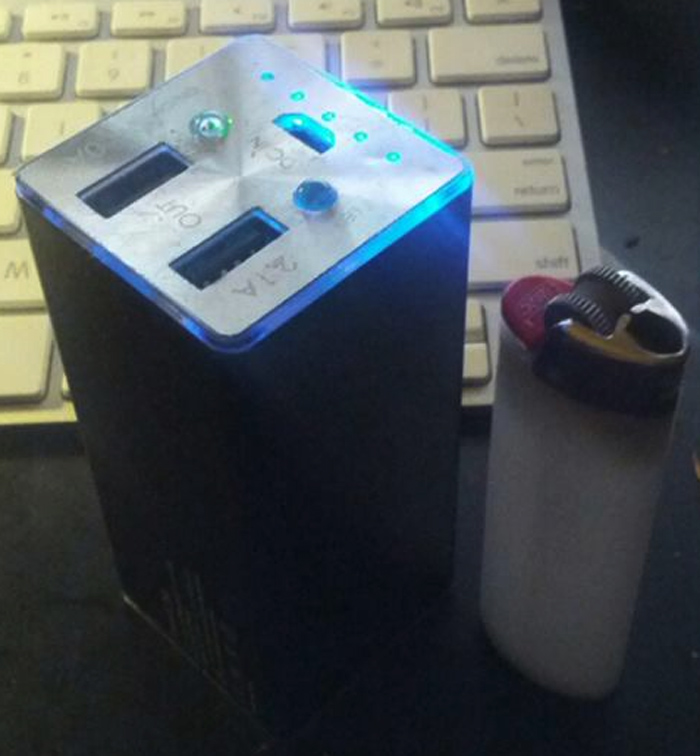
These chargers come in all shapes, sizes, colours, and capacities. Picking one that works for you can be difficult. This one is 11200mAh. Plenty of juice for a few charges of the old iPhone. It also offers two differently wired outputs, one for phones and one for tablets. I've learned that the tablet output charges my phone at a faster rate.
The Konnet PowerEZ Pro is slightly taller than a Bic lighter, and is about 1.5" squared. It takes forever to charge on MicroUSB, but holds itself like a tank in battle. I paid $50 for it at a local computer store.
If you're in the market for a USB power bank, remember that the more mAh the better. Something worth your time is likely to be over 10,000mAh or 10Ah.


Here's how you build a smart timepiece: attach an iPhone to it

Here's how you build a smart timepiece: attach an iPhone to it

iphone-bissol
Samsung's Galaxy Gear and Fitbit's upcoming Force wristband can both lay claim to being smarter than your average timepiece, but Bissol's Calibre 2000 outdoes them both. Featuring an automatic Swiss movement exposed by windows at its front and back, this mobile timepiece plugs into the bottom of an iPhone 5 or 5S. It comes in a variety of anodized aluminum hues, matched to Apple's latest iPhone color schemes, and aims to combine the sophistication of traditional watchmaking with the utility of modern technology. The price for one of Bissol's latest is a reported $1,500, though the company also has the earlier Calibre 788 model, which is somewhat more affordable.
Bissol-timepiece


Check Quality Of Nokia Mobile Handset By IMEI Number

Check Quality Of Nokia Mobile Handset By IMEI Number

Do you use a NOKIA handset?
If yes, then do you know, from which country your handset was made.
Yes! You can surely figure out this answer by following this easy trick!
STEPS:
1. On standby mood of your Nokia phone, PRESS *#06# (SEE THE ABOVE PHOTO)
Check Quality Of Nokia By IMEI Number
2. You will see a number of 15 digits on your screen, just like this:
How to know Nokia Mobile Quality from IMEI number 
3. You have to remember the 7th & 8th digit of that number (02 in the above case, see the yellow marked area of the above photo).
4. Now, match your number with the following chart to know the answer!
Check quality of Nokia by IMEI number
NOW, THE QUESTION OF QUALITY!
00 = HUNGARY = ORIGINAL FACTORY MADE = BEST
10 or 01 = FINLAND = VERY GOOD QUALITY
20 or 02 = GERMANY = FAIR QUALITY
13 or 31 = AZERBAIJAN = VERY BAD QUALITY + INJURIOUS TO HEALTH


Tricks to unlock your samsung mobile

Tricks to unlock your samsung mobile

To unlock your phone put a
sim from another company,
now type *#9998*3323#
it will reset your phone. Push
exit and then push 7,
it will reset again. Put your
other sim in and it will say sim
lock,
type in 00000000 then it should
be unlocked. Type in *0141#
then the green call batton and
it’s unlocked to all networks.
This code may not work on the
older phones and some of the
newer phones.
If it doesn’t work you will have
to reset your phone without a
sim in it by typing
*#2767*2878# or
*#9998*3855#

HTC mobile secret codes

HTC mobile secret codes

These codes work on most
HTC Mobile Phones
Phone information b>
*#*#7780#*#*
Battery information:
*#*#7780#*#*
Battery history: *#*#7780#*#*
This code for Bluetooth test:
*#*#232331#*#*
Bluetooth device address:
*#*#232337#*#
LCD test: *#*#0*#*#*
View RAM version:
*#*#3264#*#*
WiFi MAC address:
*#*#232338#*#*
Melody test: *#*#0673#*#* OR
*#*#0289#*#*
touch screen version:
*#*#2663#*#*
touch screen test:
*#*#2664#*#*
proximity sensor test:
*#*#0588#*#*
GPS test: *#*#1472365#*#* or
*#*#1575#*#*
PDA, Phone, H/W, RFCallDate:
*#*#4986*2650468#*#*
for PDA and Phone:
*#*#1234#*#*
FTA SW Version: *#*#1111#*#*
FTA HW Version: *#*#2222#*#*
This code for PDA, Phone, CSC,
Build Time,Changelist number:
*#*#44336#*#*
This code for Packet Loopback:
*#*#0283#*#*
to test device press(Vibrationt
and BackLight test also)
b>*#*#0842#*#*

Call someone from his own number [Not Free]

Call someone from his own number [Not Free]

1. Go to http://www.mobivox.com and register there for free account.
2. During registration, remember to insert Victim mobile number in “Phone number “field.
3.Complete registration and confirm your email id and then login to your account.
click on “Direct WebCall”.
4.You will arrive at page shown below. In “Enter a number” box, select your country
and also any mobile number(you can enter yours)
6. Now, simply hit on “Call Now”
button to call your friend with his own number.
7. That’s it. Your friend will be shocked to see his own number calling him
[You can change one victim's number to another]

How to make your Nokia Phone a Wi-Fi Hotspot ?

How to make your Nokia Phone a Wi-Fi Hotspot ?

on  at 12:27 pm
So do you want to use your Nokia phone as Wi-Fi Hotspot so that you can access internet on different laptops and other portable devices through your mobile phone than tune into this post because we are goinn to show you how you can make your Nokia Phone into a Wi-Fi Hotspot. JoikuSpot is an awesome application for mobile phone which makes your Nokia Phone into a Wi-Fi Hotspot
HERE is Software link
http://www.joiku.com/products/joikuspot_light

How to Clone any SIM Card

How to Clone any SIM Card


Let’s Start Sim Cloning :

Things You'll Need
  1. New Blank SIM card
  2. SIM card duplicator or cloning tool

    you can buy it here.LINK

Instructions :
1)First you'll need the IMSI (International Mobile Subscriber Identifier) number. This string of numbers is usually imprinted on the SIM card itself. This is an example of an IMSI number:
IMSI:429011234567890

An IMSI is usually 15 digits long, but can be one or two digits shorter.

How to block unwanted incoming calls and SMS

How to block unwanted incoming calls and SMS

How-to-block-unwanted-caller-ID

Are you sick of having to ignore unwanted calls? Well you can always block unwanted incoming caller ID, paid or free.
There are many apps out there to block any incoming calls or SMS, like Mcleaner, it support “black” and “white” list to reject any calls, and it works on iPhone, S60, UIQ, and Motorola cell phones. You can try it at http://www.mcleaner.com/, the price is $11.99. Also the famous anti-virus software Kaspersky’s mobile security offers the same functionality which charges $29.99 per year per mobile. Of course it can protect your Smartphone from malware and network attacks as well.
If you have an iPhone or Android mobile phone, you can find relevant softwares in App store.
There are also free ones. If you have a BlackBerry cell phone, you can try a app called CallsBlocker, it allows you to block unwanted calls a few different ways.
There are also good news for Nokia and Sony Ericsson mobile phone users. SE mobile phones have built-in blocking functions, simply go to Settings > Calls > Manage Calls > Accept Calls > Only from list, press ‘Edit’ to choose the numbers. For Nokia mobile phone users, there is an app called Blacklist which can cancels unwanted call immediately even before your phone starts ringing. Your phone will be always busy for an unwanted caller even without bringing your attention. Isn’t it interesting?

Tricks to try Android on HTC Windows Mobile phone

Tricks to try Android on HTC Windows Mobile phone

How to install Android on HTC Windows Mobile phone

Google android cell phone is in direct competition with Windows Mobile phone and Apple’s iPhone, but it has already gained a lot of fans. If you want to try the new OS, you do not have to buy an Android cell phone. If you have a HTC Windows Mobile phone, you may try install Android OS on it. Although it’s not the default OS, you can use Windows Mobile boot loader called HaRET to boot your cell phone into Android.
However, not all Windows Mobile phone support it, Newer GSM devices will have a better chance, and to date CDMA is scarcely supported.
It only takes a few steps to complete it, however it’s rather tedious. First you need to make sure that your cell phone is supported, and then you need to download the relevant Android files. The final step is to install it, however, you may need to format your cell phone first and configure a few files. After finishing all these, you can use HaRET to reboot your HTC Windows Mobile phone with Android OS.

Android cell phone hidden secret codes

Android cell phone hidden secret codes

These codes vary, depend on different cell phones, some secret codes may not be available. Please be cautious before try these codes on you cell phone, and you are responsible for any consequences of you actions.
*#*#4636#*#*
Display cell phone, battery, usage statistics and WiFi information
*#*#7780#*#*
Restore to factory settings, do not delete preinstalled apps and SD card files
*2767*3855#
Restore to factory settings; delete all files in SD card
*#*#197328640#*#*
Launch service mode to test and change certain settings
*#*#232339#*#* or *#*#526#*#* or *#*#528#*#*
Test WiFi
*#*#232338#*#*
Display WiFi MAC address
*#*#1472365#*#*
GPS test
*#*#1575#*#*
Other GPS test
*#*#232331#*#*
Bluetooth test
*#*#232337#*#
Display Bluetooth physic address
*#*#8255#*#*
Start Gtalk monitoring
*#*#4986*2650468#*#*
PDA, Phone, H/W, RFCallDate
*#*#1234#*#*
PDA and Phone
*#*#1111#*#*
FTA SW version
*#*#2222#*#*
FTA HW version
*#*#44336#*#*
PDA, Phone, csc, build Time, anzhi.name, changelist number
*#*#0283#*#*
Packet Loopback
*#*#0*#*#*
LCD test
*#*#0673#*#* or *#*#0289#*#*
Melody test
*#*#0842#*#*
Device test such as viberation and lightness
*#*#2663#*#*
Display touchscreen version
*#*#2664#*#*
Touchscreen test
*#*#0588#*#*
Distance sensor test
*#*#3264#*#*
Display memory version


Free cell phone tracking software -Cell phone locator-GPS tracker

Free cell phone tracking software -Cell phone locator-GPS tracker

Cell phone tracking softwares are now widely for funny or track lost/stole mobile devices either via GPS or GSM, especially giving iPhone and Android devices are so popular around the world, the demand for mobile locator softwares reached a record high. In order to help our readers to choose the best mobile trackers, we compared the cell phone GPS tracking softwares available and recommend the five best to smartphone users.

MobiWee

MobiWee currently supports Windows Mobile, Android, iPhone, and BlackBerry devices. Users can remotely Locate and track their device, retrieve their information, then lock, wipe, encrypt, delete certificates (for the corporate user), and shutdown their device from any web browser- even if the SIM card has been removed.

Find My iPhone

Once you enabled Find My iPhone on your handset, you can:
1. Locate your iPhone on a map.
2. Set a passcode lock remotely.
3. Display a message or play a sound on your lost handset.
4. Protect your privacy with Remote Wipe.

InstaMapper

InstaMapper is a free service that allows you to track a GPS-enabled mobile devices online in real time.
1. Lots of storage.
2. Access to raw data.
3. Location sharing.

Buddyway

Buddy is a free GPS track maker for mobile devices that allows you to track any handset or PDA with built-in GPS (or with Bluetooth GPS receiver) in real time.
1. Track any GPS-enabled device in real-time online.
2. Save trips for later reference.
3. Share the trips with desired people or keep them private.
4. Capture and comment on particular locations of your trip (in real-time) directly from your handset.
5. Import and save trips to Google Earth to visualize them in 3D-mode and more.
6. View route statistics and charts: route length, route duration, avg. & max. speed, altitude changes, etc.
7. Setup alerts on desired regions and get alerted when nearby.
8. See the list of supported devices on the website.

Mobile tracking system

Mobile Tracking System 1.51 is a free mobile phone tracker, it allows you tracing a handset’s location via Gps.
1. Tracking a mobile device’s location from a GSM mobile device or GPS receiver.
2. Tracing your current location from a GSM cell phone or GPS receiver.
3. Add or edit a cellid directly from the mobile client.
4. Realtime any user tracking (if allowed by user).
5. Send and receive e-mail messages directly to and from the MTS client.
6. Send and receive MTS chat messages.
7. Send and receive files.


Charge your battery the smart way

Charge your battery the smart way

Generally, battery life depends on your settings and apps you run. Meanwhile, knowledge about battery maintenance is also important. You may have backups, but if you own an iPhone, unfortunately you are not able to change the battery.
Take Li-on battery as example. When you buy a new battery, it does not matter how many times you charge and discharge it. But after a long time of usage, usually more than one year, you will notice the difference. The battery lasts shorter as there is a loss of battery capacity.
There are rumors on the internet that new battery should be charged for more than 12 hours for three times, then totally discharge it in order to activate the most battery capacity.
Well according to experiments, the best way to maintain a Li-on battery is light usage and quick charge and discharge. The battery life depends on how many times you fully charge and discharge it, the more times, the shorter battery life.
For normal users, the right time for charging your battery comes when 10% or 20% of your battery capacity is used, and 50% is acceptable too. The situation you should avoid is a full discharge, do not wait until your battery is used up.
Other factors worth noting is that temperature also has an impact on the battery lifespan. When the temperature is too high (over 30) or too low, the battery life could suffer a loss. For instance, when plug in your power supply, you should take the battery out from your laptop. It’s not because it may over charge your battery, but laptop overheating could cause damage to the battery. Of course if you suffer from a power shortage, it’s wise to keep your laptop battery where it is to avoid loss of private data.

Connect laptop to the Internet using Internet tethering

Connect laptop to the Internet using Internet tethering

Long ago, we rely on cables heavily to connect our laptop to the Internet for web browsing, Email sending and receiving, chatting and shopping online. Later we have wireless technology to get rid of the wires. If you have a wireless router, you can connect your PC without wires which makes our room quite clean.
But there’s always more options. With the development of new technology, you do not need a wireless router to browse the internet from your laptop. If you have a Smartphone with a data plan, you can use it as a modem to gain Internet access on your notebook and it’s called mobile tethering.
At the moment, there are a few ways for your handset to function as a modem, and they are USB tethering, Wi-Fi tethering and Bluetooth tethering. If you have a Wi-Fi, Bluetooth enabled iPhone, Android or Windows Phone 7 Smartphone, you can choose anyone of them and the settings are more or less the same. However always keep in mind you need a data plan and possibly you will get charged for it.
USB tethering
If you have 3G network access from your cell phone, USB is a good choice. Take Moto Mile stone 2 for example. First you need to change your USB mode to “debugging of your phone” in settings–>applications–>development. Then download adb driver for x86 to your laptop and unzip it. Finally run Android Tethering PC client on your laptop and the job is finished on your notebook.
Now you need to Android Tethering app on your phone, search tether on Android market if you do not have it. Change the port to 6544 after finishing installing it and start the service. Now everything’s completed and you can start to browse the Internet from your laptop.
WiFi tethering
If your Smartphone is WiFi enabled, you can go with Wi-Fi tethering and it’s really simple. You can use a WiFi hotspot app to turn your handset into an access point. If you have iPhone running iOS 4.3+, you can enable personal hotspot (you need to set a password) and your iPhone now acts like an access point.
Bluetooth tethering

Bluetooth now becomes an essential part of Smartphone, if you pair it with your laptop (you need an external Bluetooth USB Dongle if it’s not in-built), you can share 3G network access with your laptop.
If you have iPhone 4.3, you can choose Bluetooth tethering in personal hotspot setting.
Although you can use your mobile device as a mode, but there’s still a few things you should know. If you do not have 3G access on your handset, give up on it. Meantime, it drains your mobile battery quickly, so you need a replacement battery. Finally, you may get charged for Internet tethering, always contact your carrier, otherwise you will be mad at your phone bill.

Two easy steps turn Galaxy Nexus into a tablet

Two easy steps turn Galaxy Nexus into a tablet

Galaxy Nexus comes with a 4.65″ high-definition Super AMOLED display with 720 pixel high resolution screen; we really need to take full advantage of it. However it looks just like another cell phone by default. Here we will with the help of two free apps convert it into a small tablet and control it using mouse and keyboards. Here’s how.
You need to root your Galaxy Nexus before proceeding and you must be aware of the consequences.
We first download the free app LCD Density Modde from Android Market and open it and set the resolution. Once it runs, you can see that the default resolution is 320dpi, we here change it to 240 or 241dpi; however some widgets may look deformed under 240dpi. You should always try other numbers and find out the one works best for you! In my case, I set it at 210dpi and I could operate it flawlessly. Now reboot your phone and you will notice the difference, a lot more room!
Then we need the second free app Apex Launcher. Download and install it, set it as the default launcher. Now go to settings->desktop, changes the Horizontal grid and Vertical grid to ’7×7′ or ’7×6′ depending on your resolution. If you select 240dpi, go with ’7×6′, if less than 240dpi, select ’7×7′.
Finally, plug in your OTG (On-The-Go, Galaxy Nexus support OTG by default) line and wireless mouse and keyboard receiver and you can use your Galaxy Nexus as PC. Just type freely and your mouse will work precisely, just like your PC experience!
Please note Apex Launcher will not be installed as system apps, you need to manually move its files from data/app to system/app

Getting rid of Android Adhoc WiFi patch

Getting rid of Android Adhoc WiFi patch

If you are an Android enthusiast like me, you probably find that your Android phone could no longer connect to your Adhoc WiFi network again after upgrading to Ice Cream Sandwich4.0.3. Well this is kind of weird since my Symbian phone could connect to the WiFi network without a problem, so I take it as granted and never think it’s necessary to buy a wireless router.
Anyways, I copied the patch wpa_supplicant to the folder system\bin again (always remember to back up the original file first), however my phone just could not find the SSID which my Symbian phone is connected to however hard I try. It seems now this patch simply does not work anymore.
This really pisses me off as my android phone turns useless without WiFi connectivity. I do have 3G data plan; however with merely 0.5G data I could do nothing. I generally stream music and movie now and then, I also check my Email inbox, check my friends’ Facebook activities and other stuff from my mobile phone. So my data plan is hardly enough.
So I decide to dig this a little bit deeper and finally I find a solution which will let you get rid of the ridiculous patch. Since Android does not provide support for Adhoc network, we will have to setup a soft or virtual AP (access point).
To start with, you need Windows 7 operating system (both home and flagship version will do) or Windows Server 2008 R2. If you are still with Windows XP and have no plan to buy a wireless router, dump your old XP and upgrade to Windows 7. You also need a wireless router which supports Hosted Network with Windows 7 certified driver. If you are not sure, navigate to your Network Connections window, if you see something like Microsoft Virtual WiFi Miniport Adapter, then your wireless adaptor should be OK.
Even if you do not see the Microsoft Virtual WiFi Miniport Adapter, it does not mean there is no hope. Maybe you just need to enable it.
Now we will do the command work Click on the start icon on the bottom-left corner, type cmd and hit enter, type “netsh wlan set hostednetwork mode=allow ssid=YourNetworkName  key=YourNetworkPassword” (without quotes) once the Command Prompt window appears and hit enter.
This command should setup a WiFi network like any other real networks. Please note this virtual AP uses WPA2-PSK encryption and is quite safe until you reveal the password to anyone who should not be trusted.
Now we need to start the WiFi network we create, enter netsh wlan start hostednetwork and hit enter. To stop it type netsh wlan stop hostednetwork.
Now your Android phone should be able to find your newly created AP, just type the password and enjoy the free internet access.


How SuperOneClick roots an Android phone

How SuperOneClick roots an Android phone

SuperOneClick is widely used to root Android phones. If you own an Android handset, the chances are that you may have used it. This program gives you the ability to root your handset with one click, and it works great with mobile devices running Android 2.3-4.0. However few people ever introduce how it works. I’ll try to explain it a little bit here.
To start with, you need to know something about ADB (Android Debug Bridge). You may not hear about it, but I bet you use it often. Go to settings->Developer options, check USB debugging and you enables ADB. It’s designed for developers to test Android apps. In fact many apps use it to manage your handset, including root programs like Z4root and SuperOneClick etc.
In order to root your device, you need to install the drivers from the official manufacturer, enable USB debugging and installing apps from other sources. Then connect your phone to the PC via USB. At the same time, download and install SuperOneClick on your PC. It will automatically install the app on your handset.
The rooting process is like this.
1. Copy rageagainstthecage to /data/local/tmp folder. This is a temp folder in Linux where apps can be executed by even normal users. The command line is as follows:
c:\users\imb>$adb push rageagainstthecage /data/local/tmp
2. Use ADB shell to change the permission of rageagainstthecage. Command lines:
c:\users\imb>adb shell
$ cd /data/local/tmp
$ chmod 777 rageagainstthecage
3. Run rageagainstthecage.
$ ./rageagainstthecage
[*] CVE-2010-EASY Android local root exploit (C) 2010 by 743C             
[*] checking NPROC limit …
[+] RLIMIT_NPROC={2410, 2410}
[*] Searching for adb …
[+] Found adb as PID 19374
[*] Spawning children. Don’t type anything and wait for reset!
[*]
[*] If you like what we are doing you can send us PayPal money to
[*] 7-4-3-C@web.de so we can compensate time, effort and HW costs.
[*] If you are a company and feel like you profit from our work,
[*] we also accept donations > 1000 USD!
[*]
[*] adb connection will be reset. Restart adb server on desktop and re-login.
$
4. Now exit ADB shell, later reenter ADB shell. If the comman prompt turns from $ to #, root access is obtained, otherwise repeat the command.
 c:\users\imb>adb shell
#
5. Change the permission of system folder from read to read and write, and copy su to /system/bin/ folder. su allows you to switch from normal user to root.
# mount -o remount rw /system
#adb push su /system/bin
6. Copy Superuser.apk to the device and install it.
#adb push Superuser.apk /data/local/tmp
#adb install /data/local/tmp/Superuser.apk
7. Reboot the phone and finish the rooting process.
#adb reboot
Here rageagainstthecage used in this process is to exploit the system and gain root access, which enables SuperOneClick to change the permission of \system folder and copy su here. Root access is managed by people via the Superuser.apk process, with which you should be familiar.
Here are some mostly used adb command lines.
adb devices    //view devices connected to the PC.
adb install <filename>   //install an app on the phone.
adb uninstall <appname>  //remove an app from the phone
adb shell       //login to shell
adb push <resource> <destination>  //copy file from PC to Android devices.
adb pull <destination> <resource>    //copy file from Android devices to PC.
adb help    //view help information


More iPhone tricks and tips

More iPhone tricks and tips

Restart your iPhone
Press and hold both the Home button and the Sleep button to restart your iPhone. After a moment, a white light will flash, the screen will shut off, keep holding the buttons until the screen turns back on.
Take a screenshot
Hold the home button and the Sleep/Wake button. The screen will flash in white and the screenshot will appear in your Camera Roll.
Create web clips
To add a website to your Home screen, visit the page in Safari and tap the plus sign at the  bottom of the screen. Now tap “Add to Home screen.”
Use the compass with maps
Press the location button in maps twice to use the built-in compass to orient the map based on the direction you are facing.
Locate your lost iPhone
If your iPhone goes missing, Find My iPhone can help you locate it and show its current location on a map. Display a message on its screen, remotely set a passcode lock, or initiate a remote wipe to delete your private data.
Save image from web pages
To save any image from the web to your camera roll, simply press and hold the image. A menu will appear asking “Save image” or “Cancel”. Once the image is saved in your camera roll, you can set it as wallpaper
Zoom the camera
Press the screen to bring up the zoom control, then use the slider to zoom in and out up to 5MP.
Focus the camera
While shooting videos or photos, press the screen where you want to focus. iPhone will also adjust the exposure and white balance automatically.
Scrub through audio and video
When you’re watching a video or listening to music or a podcast, the scrubber bar lets you skip to any point along the timeline. You can adjust the scrub rate from high-speed to fine scrubbing by sliding your finger down as you drag the playhead along the scrubber bar.
Create an iPod playlist
In the iPod app, tap Playlists, then tap Add Playlist and give it a name. Now tap any song or video to add it to the playlist. You can add  individual songs,  entire albums or all songs by an artist.
More keyboard and input tricks
Tap the space bar twice, and iPhone adds a period and capitalizes the next word.
To enter a number  or symbol quickly, touch and hold 123, the select the key you want. Lifting your finger returns you to the alphabet keyboard.
Hold a letter to reveal a list of special characters.
Hold down the”.com” key for”.net, .edu, .org” keys. Note: Slide your finger from .com to .net/.edu/.org, rather than lifting and pressing.
Find the text you want to edit in a note, email, web page, or other app. You can select a word by double-tapping it, and select more or less text by dragging the grad points. Then press to cut, copy, or paste. To undo an edit, shake iPhone, the press the Undo button.
Email and Text management
In Email, you can delete or move messages in batches. From your inbox, press Edit, check off the desired emails and then choose Delete or Move.
Delete email messages and text conversations without opening them, simply” cross it out” by swiping your finger across the email or the text conversations, then press Delete.
Print wirelessly from your iPhone
Airprint makes it easy to print email and web pages right from your iPhone to your air-print-enabled printer. To print an email, just press the Reply icon and select Print. To print a web page, press the Action icon and select Print. You can also print photos, documents, and more.


Copyright © 2015 TechElectro - Blog
| Distributed By Mishu